

Search Website
Training and Drop-Ins
About
The Centre for Teaching and Learning, in collaboration with Western Technology Services, offers a variety of support and assistance options for instructors and support staff. Explore the options below and click on each to learn more.
Discover the range of tools and methods for teaching in OWL Brightspace at a pace that suits you.
Created using Brightspace, this self-guided training is for anyone teaching or supporting a course (e.g., instructors, course coordinators, support staff, instructional designers and TAs). It has been created to specifically support Western and affiliate instructors moving from OWL Sakai to OWL Brightspace. This guide not only explains how to use OWL Brightspace but also highlights any differences between it and OWL Sakai.
While we recommend working through the training in order when thinking about creating and running effective course sites, the modules are also divided into different sections that address specific topics.
How to Access the Training:
- Log in to your OWL Brightspace account
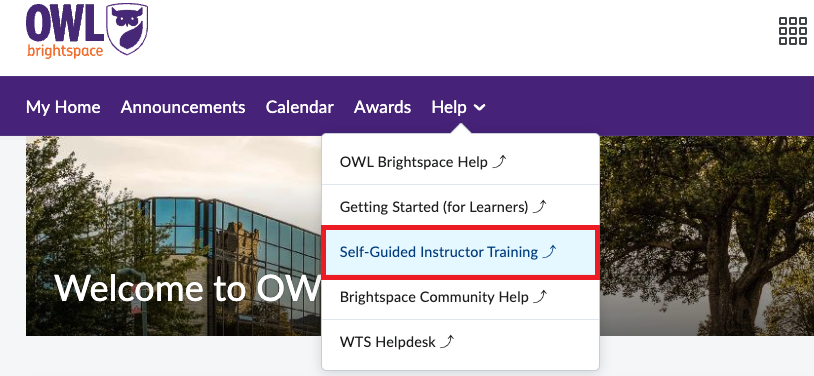
- Select "Help" from the purple navigation toolbar at the top. Then choose "Self-Guided Instructor Training".
Western Technology Services and some third-party vendors are offering a variety of training sessions on OWL Brightspace and its integrated tools. We believe these sessions will enhance your experience and will focus on frequently asked topics. Please select and register for any of the options below:
30-Minute Knowledge Boost Sessions:
Setting up Online Proctoring| October 6, 2026 at 10 am
3rd Party Tools (1-hour, Vendor-led):
iClicker| September 22, 2026 at 11 am